You just bought a brand-new domain name for your business. Congratulations! The checkout page shows a small checkbox: “Domain Privacy Protection — $9.99/year.”
You hesitate. Do I really need this? Is this just a money grab by the registrar? My address is already in the phone book.
Here’s what most registrars won’t tell you: Without domain privacy, your full name, home address, phone number, and email address become publicly available to anyone on the planet within minutes of registration.
And not just anyone—spammers, scammers, stalkers, competitors, and automated bots that scrape WHOIS databases 24/7.
Let me walk you through exactly what domain privacy protection does, whether you actually need it, and the one specific scenario where you should never enable it.
Part 1: The WHOIS Database — Your Public Profile
To understand privacy protection, you first need to understand WHOIS.
WHOIS is a public directory mandated by ICANN (the organization that governs domain names). Every time you register a domain, you’re legally required to provide accurate contact information:
- Registrant Name: Your full legal name or business name
- Organization: Your company (if applicable)
- Address: Street, city, state, postal code
- Phone Number: Direct line
- Email Address: Primary contact
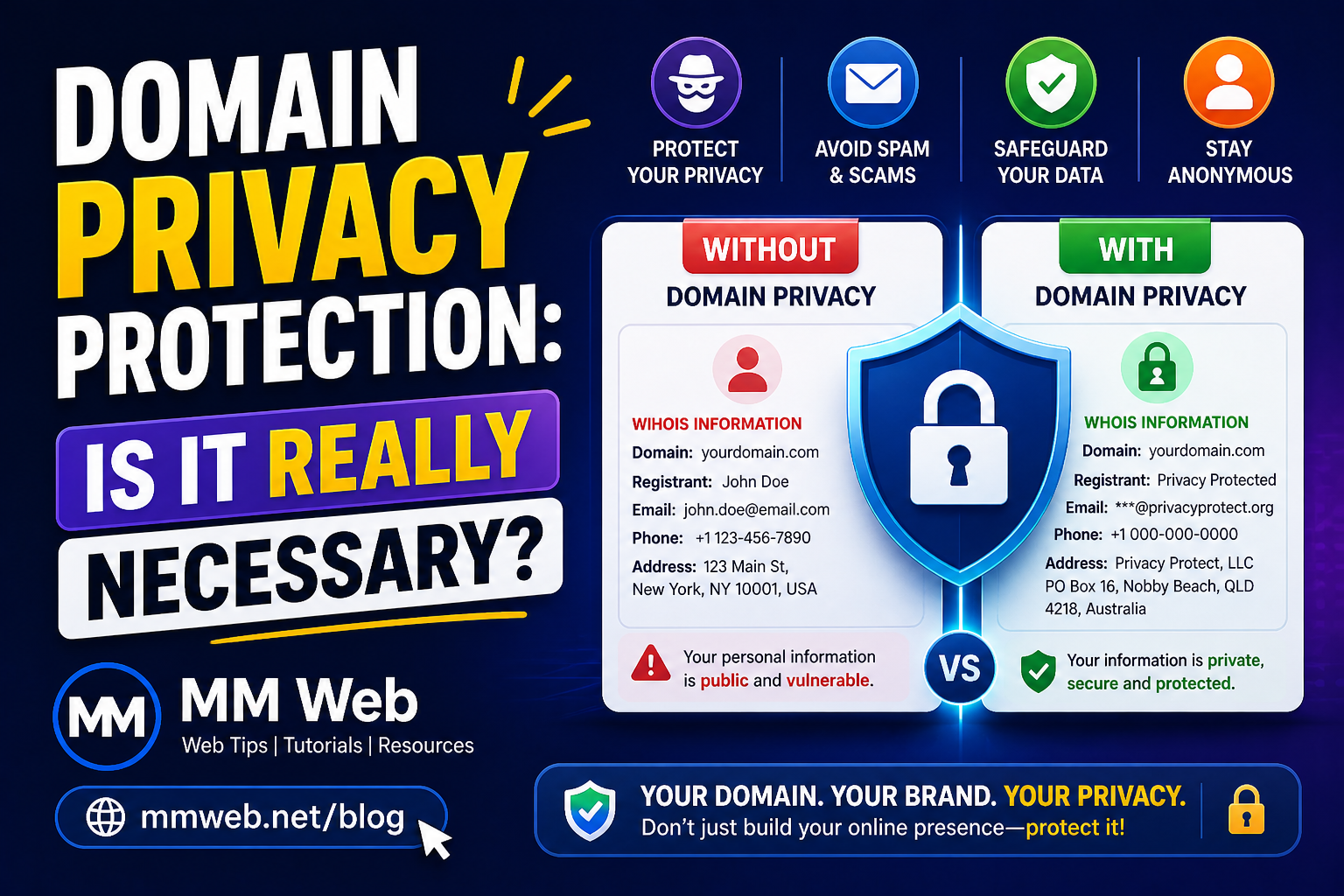
Without privacy protection: Anyone can type your domain into a WHOIS lookup tool (there are hundreds of free ones) and instantly see every piece of that information.
With privacy protection: The registrar replaces your personal details with generic forwarding information. Your name becomes Redacted for Privacy, your address becomes the registrar’s office, and your email becomes a forwarded alias like privacy@registrar.com.
| Field | Without Privacy | With Privacy |
|---|---|---|
| Registrant Name | John A. Smith | Redacted for Privacy |
| Address | 1234 Main Street, Anytown, USA | 14455 N. Hayden Rd, Scottsdale, AZ |
| Phone | (555) 123-4567 | +1.5555555555 (registrar’s line) |
john@smithfamily.com | pq7r9x2j@privacyforward.com |
Part 2: The Real Risks of Exposed WHOIS Data
Let me be brutally specific about what happens when your personal information sits unprotected in the WHOIS database.
Risk 1: Targeted Spam and Phishing
Within 24 hours of registering a domain, automated scrapers will find your email address. You’ll receive:
- Fake “domain renewal” invoices (scammers hoping you’ll pay them instead of your real registrar)
- SEO “services” from bottom-feeder agencies
- Hosting upgrade scams
- Phishing emails pretending to be ICANN compliance officers
Real example: A friend registered a domain at 10 AM. By 3 PM, he received an urgent email: *”YOUR DOMAIN EXPIRES TODAY — CLICK HERE TO RENEW FOR 129.”∗Hisactualrenewalcost:14.99. The link led to a credit card skimmer.
Risk 2: Physical Harassment and Stalking
This is not theoretical. The WHOIS database includes your street address.
- Home-based business owners have reported customers showing up unannounced at their residences.
- Political bloggers and activists have been doxxed via WHOIS lookups.
- Public figures and journalists have received threatening letters mailed directly to their home addresses pulled from domain records.
Risk 3: Competitive Intelligence Leakage
Your competitors can see:
- Every domain you own (by searching your name or email across WHOIS)
- Your portfolio size and strategy
- When you’re launching new projects (before they’re public)
A domain investor once told me, “I never buy domains without privacy. Otherwise, every shark in the pool knows exactly what I’m bidding on next.”
Risk 4: SIM Swapping and Account Takeover
This is the most technically dangerous risk.
A malicious actor finds your phone number in WHOIS. They call your mobile carrier, social-engineer a customer service rep, and port your phone number to their own SIM card.
Now they control your SMS-based two-factor authentication. They reset your email password. Then your bank. Then your domain registrar account. Then they transfer your domain to Russia.
This happens regularly. Google “SIM swap domain theft” and prepare to be horrified.
Risk 5: Doxxing and Reputation Damage
If you run a controversial website, a political blog, or any platform that upsets people, your WHOIS information becomes a weapon. Activists, journalists, and even small business owners in polarized industries have faced:
- Swatting (fake emergency calls to your address)
- Harassment campaigns
- Negative reviews left by people who found your home address
Part 3: The “But I’m a Business” Argument — Debunked
Many business owners think, “I have an LLC. My address is already public. I don’t need privacy.”
This is flawed logic for three reasons:
Reason 1: Discovery friction. Yes, your business address might be on your website or state filing. But finding it requires active searching. WHOIS puts it in an automated, indexable, API-accessible database that bots scrape continuously.
Reason 2: Personal vs. registered agent. Even if you use a registered agent for your LLC, the WHOIS registrant field likely contains your personal name as the contact. Do you want your home address tied directly to every domain you own?
Reason 3: Phone number exposure. Your business phone might be public. Your personal cell phone should not be. WHOIS exposes whichever number you provide.
The Legitimate Counterargument
If you’re a public-facing business that wants to appear transparent (e.g., a law firm, a real estate agency, a consulting practice), displaying your real contact information in WHOIS can build trust. Some customers actually verify WHOIS records to confirm you’re legitimate.
But for 95% of domain owners, the risks outweigh that marginal trust signal.
Part 4: The One Scenario Where You Should NEVER Enable Privacy
This is critical, and most articles get it wrong.
If you run a professional email service, a marketing email platform, or any system that sends bulk email (including newsletters, transactional emails, or cold outreach), do not enable WHOIS privacy on your sending domain.
Why?
Email authentication protocols like DMARC and spam filters use WHOIS data as one of many trust signals. When a domain has privacy protection enabled, some receiving mail servers treat it as suspicious—“Why is this sender hiding their identity?”
Consequences you may experience:
- Lower inbox placement rates (email goes to spam)
- Higher rejection rates from strict corporate mail servers
- Difficulty getting delisted from blacklists (you appear less credible)
The fix: For your primary email-sending domains, use accurate, professional contact information. For everything else (personal blogs, portfolio sites, side projects), enable privacy.
Part 5: The GDPR Loophole — Do You Even Need Privacy Anymore?
In 2018, the European Union’s General Data Protection Regulation (GDPR) changed everything.
ICANN now requires registrars to redact personal information from public WHOIS for all EU residents—and most registrars (including Namecheap, GoDaddy, Cloudflare) extended this redaction globally as a default policy.
Today’s reality: Most major registrars automatically redact your personal information at no extra cost. Check your current WHOIS record using a lookup tool. You might see:
text
Registrant Name: Data protected by GDPR
Registrant Email: Please use contact form
If your registrar already provides free GDPR redaction, you do not need paid privacy protection. The registrar is already doing it.
How to check if you’re already protected
- Go to any WHOIS lookup tool (ICANN Lookup, whois.domaintools.com)
- Enter your domain
- Look for phrases like: “Redacted for privacy,” “Data protected by GDPR,” “Please use contact form,” or generic registrar contact info
If you see your real name and address exposed, you need protection. If you see redacted information, you’re safe.
Registrar-by-Registrar Reality
| Registrar | Default Protection | Need Paid Privacy? |
|---|---|---|
| Cloudflare | Full GDPR redaction (free) | No |
| Namecheap | Free WHOISGuard included | No |
| Google Domains (now Squarespace) | Redaction by default | No |
| GoDaddy | Partial redaction; full privacy is paid | Yes, if you want complete protection |
| Name.com | Basic redaction; full privacy is paid | Yes |
| Small/regional registrars | Varies widely | Check your WHOIS output |
Part 6: The Cost-Benefit Calculation
Let’s be quantitative.
| Scenario | Risk Level Without Privacy | Privacy Recommended? |
|---|---|---|
| Personal blog, non-controversial | Low (spam only) | Not strictly necessary, but cheap insurance |
| Home-based business | Medium-High (address exposure) | ✅ Yes |
| E-commerce store | Medium (competitors, customer disputes) | ✅ Yes |
| Political or religious content | High (harassment, doxxing) | ✅ Absolutely |
| Journalist or activist | Critical (physical safety) | ✅ Mandatory |
| Domain investor | High (portfolio leakage) | ✅ Yes |
| Bulk email sender | Medium (deliverability risk) | ❌ Do not use |
| Public-facing professional (lawyer, real estate) | Low (trust benefit of transparency) | No, unless you have specific concerns |
| Enterprise with legal department | Low (use corporate address) | No, use accurate corporate WHOIS |
Part 7: How to Enable Domain Privacy (Step by Step)
If you’ve decided you need privacy, here’s how to do it right.
Step 1: Check if you already have it
Run a WHOIS lookup on your domain. If your information is already redacted, stop here. You’re done.
Step 2: Add privacy at registration (cheapest)
Most registrars offer privacy for $8–15/year. Buying it upfront during registration is usually cheaper than adding it later.
Step 3: Add privacy to an existing domain
- Log into your domain registrar
- Navigate to “Domain Settings” or “DNS Management”
- Look for “Privacy Protection,” “WHOIS Privacy,” or “WHOISGuard”
- Enable the feature (may be a toggle or an add-to-cart item)
- Pay the fee (usually $8–15/year per domain)
Step 4: Verify it worked
Wait 10–15 minutes for propagation. Run another WHOIS lookup. Confirm your personal information is replaced with redacted or generic data.
Step 5: Set a calendar reminder
Privacy protection expires annually, often separate from domain renewal. Mark your calendar to renew it 30 days before expiration. Lapsing privacy even for a few days exposes your data to scrapers.
Part 8: What Privacy Does NOT Protect You From
Domain privacy is not a magic shield. It does NOT protect you from:
- Legal action: Law enforcement, intellectual property disputes, and court orders can compel your registrar to reveal your identity regardless of privacy settings.
- Your own website: If you put your email and address on your “Contact” page, privacy does nothing.
- Payment information: Your billing details remain with your registrar. Privacy only affects public WHOIS.
- DNS vulnerabilities: Privacy doesn’t secure your DNS records or prevent hijacking. That requires registry lock, MFA, and strong passwords.
Final Verdict: Is It Really Necessary?
For most people: Yes.
The annual cost ($8–15) is less than a single lunch delivery. The potential costs of exposure—harassment, identity theft, domain theft, spam floods, competitive espionage—are orders of magnitude higher.
However: First check if your registrar already provides free GDPR redaction. Many do. If they don’t, and you’re not sending bulk email, pay for privacy. It’s one of the highest-ROI security purchases you’ll make.
The one exception: If you send email at scale, keep your WHOIS information accurate and public. Your deliverability depends on it.
Quick Action Checklist
- Run a WHOIS lookup on your domain right now
- Is your personal information visible? If yes, continue.
- Check if your registrar offers free redaction (most major ones do)
- If not, purchase privacy protection for $8–15/year
- Re-check WHOIS after 15 minutes to confirm redaction
- Set renewal reminder for privacy (not just domain)
- If you send bulk email, reconsider privacy entirely
Run a WHOIS lookup on your domain right now. What did you find? Drop the result (not your actual address!) in the comments.