You’re ready to launch a website. You open your browser, search for “web hosting,” and immediately drown in a sea of options.
Shared hosting for 2.99/month. VPS for 20/month. Dedicated servers for $150+/month. Cloud hosting. Managed WordPress hosting. The list never ends.
Every provider claims to be the fastest, most reliable, and best value. Every competitor’s review site contradicts the last one you read. And the technical jargon—RAM, CPU cores, burstable instances, inode limits—makes your head spin.
Here’s the truth that hosting companies don’t want you to know: Most websites don’t need VPS. Most websites don’t need dedicated servers. And some websites absolutely shouldn’t be on shared hosting.
The right hosting type saves you money and headaches. The wrong one either bleeds your budget or crashes when you finally get traffic.
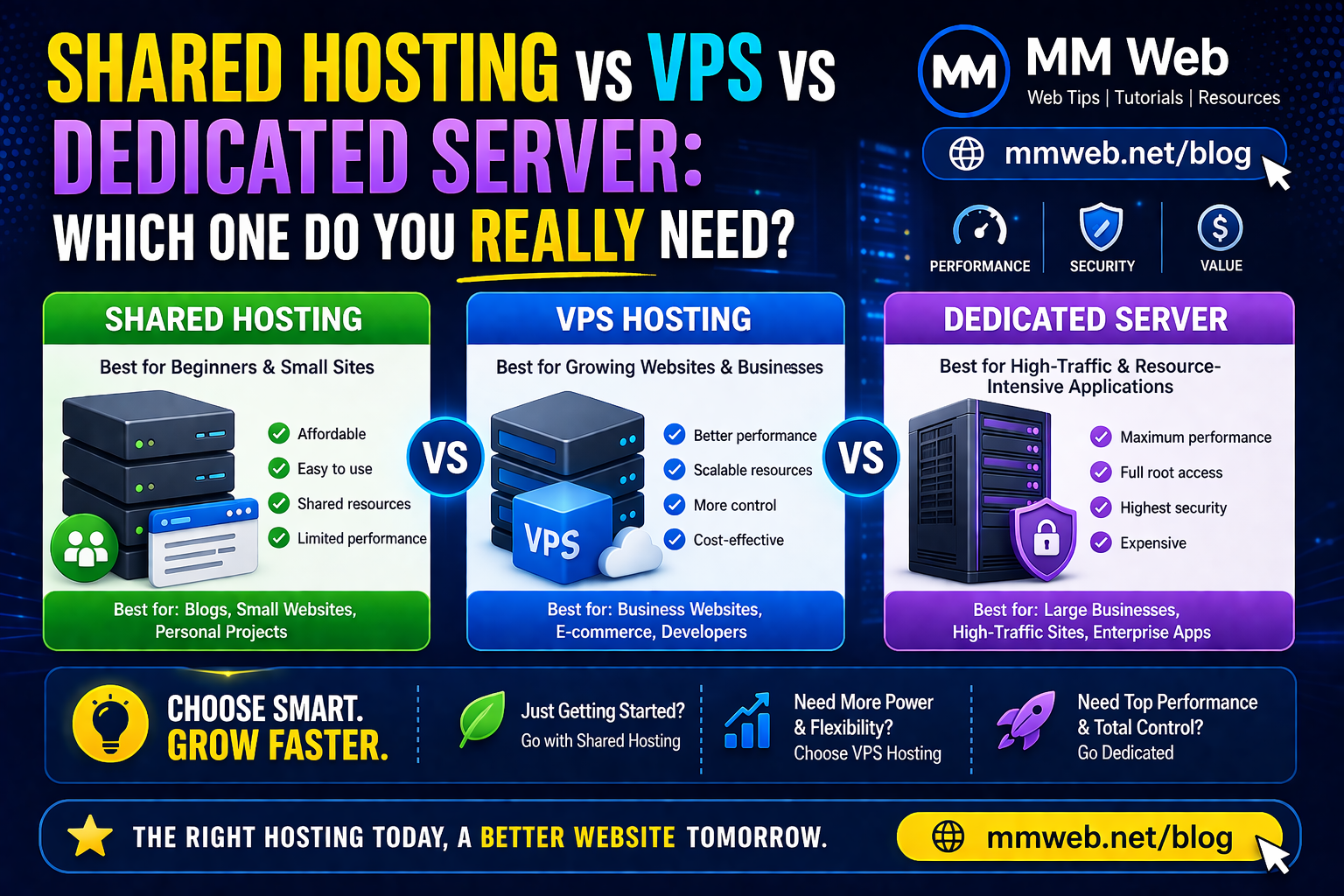
Let me walk you through exactly what shared hosting, VPS, and dedicated servers actually are—and which one you genuinely need based on your real requirements, not marketing hype.
Part 1: The 30-Second Analogy (Renting vs. Condo vs. House)
Before we dive into specs, understand the fundamental trade-off:
| Hosting Type | Analogy | You Share | You Control | Price |
|---|---|---|---|---|
| Shared Hosting | Apartment building | Kitchen, laundry, walls, roof | Nothing (just your unit) | $ |
| VPS | Condo building | Building structure, internet, security | Your entire condo (renovate freely) | $$ |
| Dedicated Server | Single-family house | Nothing | Everything (land, structure, utilities) | $$$ |
- Shared hosting: You rent a room in a crowded apartment. Your noisy neighbor blasts music (traffic spike), and you can’t sleep (site slows down). Cheap. Fine for most people. Terrible for parties (traffic surges).
- VPS: You own a condo. Your neighbors exist, but thick walls isolate you. When they host a party, you barely notice. You can renovate your kitchen (install custom software) without asking permission.
- Dedicated server: You own a house on its own land. No neighbors to disturb you. You can dig a pool, build a garage, do whatever you want. Expensive. Overkill for most people. Essential for mansions (high-traffic sites).
Now let’s get technical.
Part 2: Shared Hosting — The Entry Point
What It Actually Is
Shared hosting places hundreds (sometimes thousands) of websites on a single physical server. All sites share the same operating system, web server software (Apache/Nginx), database server (MySQL), and system resources (CPU, RAM, disk I/O).
The “fair share” illusion: Providers use software to allocate resource limits, but when a neighboring site gets a traffic spike (or gets hacked, or runs a poorly optimized script), your site feels the pain.
Technical Specifications (Typical)
| Resource | Entry-Level Shared | Business Shared |
|---|---|---|
| RAM limit | 512MB – 1GB | 2GB – 4GB |
| CPU | 1 vCPU (shared, throttled) | 2 vCPUs (burstable) |
| Storage | 10GB – 50GB SSD | 100GB – unlimited (often HDD) |
| Bandwidth | Unmetered (but throttled after threshold) | Unmetered (higher threshold) |
| Inode limit | 50,000 – 250,000 files | 250,000 – 500,000 files |
| Email sending | 100–500/hour | 500–2,000/hour |
| Backup retention | Weekly (7–30 days) | Daily (7–30 days) |
Who Is Shared Hosting For?
✅ Perfect for:
- Personal blogs (less than 10,000 visits/month)
- Small business brochure sites (5–20 pages)
- Portfolio sites for creatives
- Local restaurant or service business sites
- Landing pages for startups (pre-launch)
- Development/staging environments
- Clients on a tight budget (<$20/month)
❌ Not for:
- E-commerce stores (especially during sales events)
- Sites with more than 10,000 monthly visitors
- Membership sites or online courses
- Any site with sensitive data (PCI compliance issues)
- High-traffic news or media sites
- Sites requiring custom server software (Node.js, Python, specific PHP extensions)
Real-World Performance Expectations
| Monthly Traffic | Expected Performance | Risk Level |
|---|---|---|
| < 1,000 visits | Fast | Low |
| 1,000 – 5,000 visits | Good (with caching) | Low |
| 5,000 – 10,000 visits | Acceptable (cache critical) | Medium |
| 10,000 – 25,000 visits | Sluggish during peaks | High |
| > 25,000 visits | Unreliable | Very High |
Hidden Limitations (What They Don’t Tell You)
- Inode limits: You might have “unlimited storage” but only 100,000 inodes (files + folders). Email accounts each use dozens of inodes. Hit the limit, and you can’t upload new files or receive email.
- CPU throttling: After sustained CPU usage (often just 30–60 seconds), your site gets throttled to 10–20% speed. A single traffic spike can trigger this.
- Concurrent connection limits: Most shared hosts limit simultaneous connections to 10–50. During a viral post, real visitors see “503 Service Unavailable.”
- No root access: Can’t install custom PHP extensions, change PHP-FPM settings, or configure Redis/Memcached properly.
- Overselling: The provider might put 2,000 sites on a server designed for 500. Performance is fine until everyone’s busy simultaneously (evenings, weekends).
Pricing Reality
| Provider Tier | Monthly Price | Annual Contract | Real Cost (with renewal) |
|---|---|---|---|
| Budget (Hostinger, Namecheap) | 1.99–4.99 | 24–60/year | Renews at 2–3× intro price |
| Mid-range (Bluehost, SiteGround) | 5.99–9.99 | 72–120/year | Renews at 12–20/month |
| Premium (WP Engine, Kinsta — managed) | 20–40 | 240–480/year | Renews at same or +10% |
The trap: Initial “sale” prices expire after 12–36 months. Your 3/monthhostingbecomes12/month. Budget accordingly.
When to Leave Shared Hosting (Warning Signs)
- Your site loads slower than 3 seconds during normal traffic
- You see “Error establishing database connection” more than once a month
- Your host disables your site for “excessive resource usage”
- You need to install a custom PHP extension or Node.js
- Your monthly traffic exceeds 10,000 visits
- You’re running WooCommerce and have more than 100 products
Part 3: VPS (Virtual Private Server) — The Sweet Spot
What It Actually Is
A physical server runs multiple virtual machines (VMs) using a hypervisor (KVM, Xen, VMware). Each VM receives dedicated CPU cores, guaranteed RAM, and isolated storage. Unlike shared hosting, your resources are reserved—not “shared” subject to availability.
The key difference: On shared hosting, you’re fighting for resources. On VPS, you have a guaranteed minimum. Your neighbor’s traffic spike doesn’t affect you.
Types of VPS
| Type | Resource Model | Best For | Examples |
|---|---|---|---|
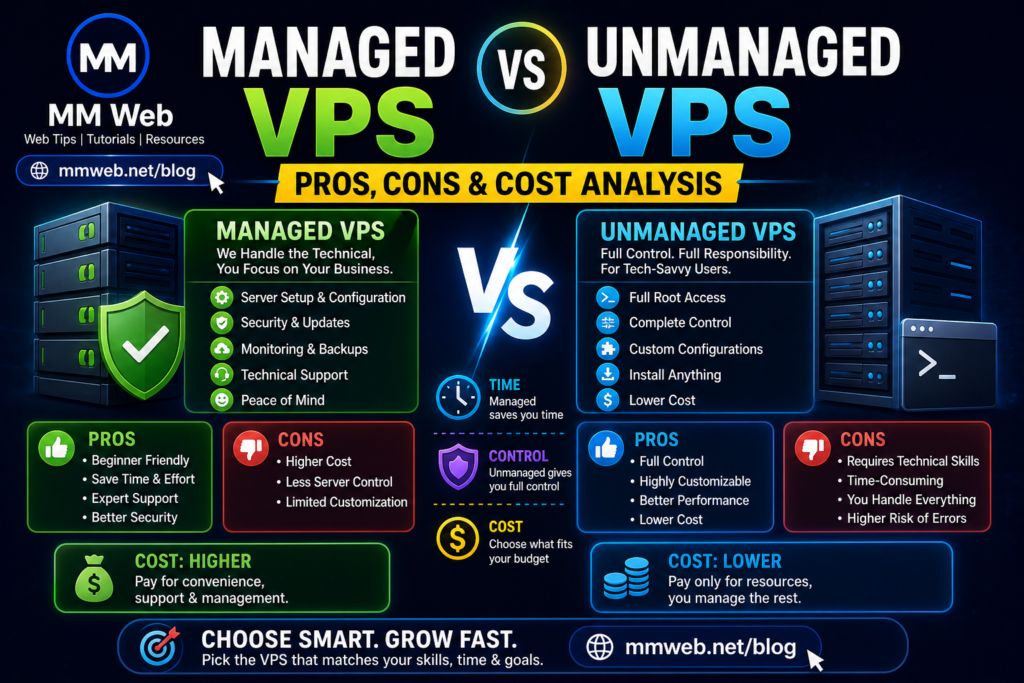
| Unmanaged VPS | You get root access, you configure everything | Developers, sysadmins, agencies | DigitalOcean, Vultr, Linode, AWS Lightsail |
| Managed VPS | Host manages OS updates, security, monitoring | Businesses without dedicated ops | KnownHost, Liquid Web, InMotion |
| Burstable VPS | Low base resources, can spike higher temporarily | Sites with variable traffic | AWS EC2 t-series, Google Cloud e2 |
Technical Specifications (Typical Entry-Level VPS)
| Resource | Unmanaged ($10–20) | Managed ($30–60) | High-Performance ($50–100) |
|---|---|---|---|
| RAM | 1GB – 2GB (dedicated) | 2GB – 4GB (dedicated) | 4GB – 8GB (dedicated) |
| CPU | 1 – 2 vCores (dedicated or burstable) | 2 – 4 vCores | 4 – 8 vCores |
| Storage | 25GB – 50GB NVMe SSD | 50GB – 100GB NVMe | 100GB – 200GB NVMe |
| Bandwidth | 1TB – 2TB | 2TB – 5TB | 5TB – 10TB |
| Root access | Yes (full) | Yes (limited on some managed plans) | Yes (full) |
| Control panel | None (self-install) | cPanel/Plesk (often included) | cPanel/Plesk (included) |
Who Is VPS For?
✅ Perfect for:
- Growing e-commerce stores (10,000 – 100,000 monthly visits)
- Membership sites (courses, subscriptions)
- SaaS applications (customer dashboards, APIs)
- Agencies hosting 10+ client sites
- Developers needing custom environments (Node, Python, Ruby, Go)
- Sites with sensitive data requiring isolated environments
- Media sites with predictable traffic patterns
- Anyone outgrowing shared hosting’s resource limits
❌ Not for:
- Beginner with no command-line experience (start with managed VPS or shared)
- Very low-traffic sites (<5,000 visits/month) — shared is fine
- Sites requiring PCI DSS Level 1 compliance (need dedicated or compliant cloud)
- Extremely high-traffic sites (500,000+ visits/month — consider dedicated or cloud)
Real-World Performance Expectations
| Monthly Traffic | Expected Performance | Configuration Needed |
|---|---|---|
| 10,000 – 25,000 visits | Fast (caching optional) | 2GB RAM, 2 vCPU |
| 25,000 – 50,000 visits | Fast (caching recommended) | 4GB RAM, 2 vCPU |
| 50,000 – 100,000 visits | Very fast (cache critical) | 8GB RAM, 4 vCPU |
| 100,000 – 250,000 visits | Excellent (optimized stack) | 16GB RAM, 6–8 vCPU |
What You Gain vs. Shared Hosting
| Feature | Shared Hosting | VPS |
|---|---|---|
| Dedicated RAM | No (shared pool) | Yes (guaranteed minimum) |
| CPU allocation | Throttled, shared | Dedicated cores or predictable burst |
| Root/SSH access | No | Yes (unmanaged) |
| Install custom software | No (PHP versions only) | Yes (anything) |
| Multiple PHP versions | Limited (1–2) | Any version, per directory |
| Docker/Kubernetes | No | Yes |
| Redis/Memcached | Usually disabled | Yes (full control) |
| Server-level firewall | Minimal | Full (iptables, UFW, CSF) |
| Email server control | Limited (Exim/Dovecot defaults) | Full (install anything) |
| Backup flexibility | Host’s schedule only | Custom scripts, offsite, incremental |
The Unmanaged vs. Managed Decision
Choose unmanaged VPS if:
- You know what
ssh,apt-get,systemctl, andnginx -tmean - You’re comfortable securing a server (fail2ban, unattended upgrades, firewall)
- You have time to monitor logs and apply security patches
- You want maximum control and minimum cost ($10–20/month)
Choose managed VPS if:
- You can use the command line but don’t want to be a sysadmin
- Your time is worth more than the $20–40/month premium
- You want someone on call 24/7 for server issues
- Your business depends on uptime but you don’t have dedicated ops staff
Hidden Costs to Consider
- cPanel/Plesk license: 15–30/month if not included
- Backup storage: Offsite backups add 5–20/month
- Monitoring tools: 5–15/month (New Relic, Datadog, Uptime Robot)
- Managed support add-on: 20–50/month if not included
- Control panel migration: If moving from cPanel to unmanaged, budget for migration time
When to Upgrade from VPS to Dedicated
- Consistent CPU usage above 70–80% for hours daily
- RAM consistently at 85%+ utilization (swap thrashing)
- Disk I/O wait times exceed 50ms consistently
- You need hardware-level isolation (compliance, security)
- Monthly traffic exceeds 250,000–500,000 visits
- Running databases larger than 50GB
- You have multiple developers needing separate staging environments
Part 4: Dedicated Server — The Ultimate Control
What It Actually Is
A physical server—real hardware, real CPUs, real RAM—dedicated entirely to you. No virtualization layer. No neighbors. Every resource is yours.
The trade-off: Complete control comes with complete responsibility. You’re renting raw metal. Everything from OS installation to security patching to hardware monitoring is your problem (unless you pay for managed dedicated).
Types of Dedicated Servers
| Type | Management | Best For | Price Range |
|---|---|---|---|
| Unmanaged dedicated | You do everything (OS, security, updates) | Large enterprises with sysadmins | 80–200/month |
| Managed dedicated | Host manages OS, security, basic monitoring | High-traffic businesses without ops team | 200–500/month |
| Fully managed dedicated | Host manages everything (application-level) | Mission-critical applications | 500–1,500+/month |
Technical Specifications (Entry to Enterprise)
| Component | Entry-Level ($80–150) | Mid-Range ($150–300) | Enterprise ($300–800+) |
|---|---|---|---|
| CPU | Intel Xeon E-2236 (6 cores/12 threads) | Dual Xeon Silver (16–24 cores) | Dual Xeon Gold (32–56 cores) |
| RAM | 16GB – 32GB DDR4 | 64GB – 128GB DDR4 | 256GB – 1TB+ DDR4/DDR5 |
| Storage | 2× 480GB SSD (RAID1) | 4× 1TB NVMe (RAID10) | 8× 2TB NVMe (RAID10) |
| Bandwidth | 10TB – 20TB (1Gbps port) | 20TB – 50TB (1Gbps) | 100TB+ or unmetered (10Gbps) |
| Dedicated IPs | 1 – 5 | 5 – 29 | 29+ (or /24 subnet) |
| Hardware RAID | Optional | Yes (hardware controller) | Yes (with BBU cache) |
Who Is Dedicated Server For?
✅ Perfect for:
- High-traffic e-commerce (500,000+ monthly visits, especially during sales)
- Large SaaS platforms (thousands of concurrent users)
- High-frequency trading or financial applications (low-latency requirements)
- Big data processing (data warehouses, analytics)
- Game servers (low-latency multiplayer)
- Video streaming or transcoding platforms
- Agencies with dozens of high-traffic client sites
- Organizations with compliance requirements (HIPAA, PCI Level 1, government)
- Anyone who needs hardware-level isolation and guaranteed performance
❌ Not for:
- Small to medium sites (VPS is usually sufficient)
- Anyone without sysadmin expertise (unless fully managed)
- Projects with unpredictable scaling needs (cloud is better for elasticity)
- Low-budget projects (VPS or shared is fine)
Real-World Performance Expectations
| Monthly Traffic | Expected Performance | Minimum Configuration |
|---|---|---|
| 250,000 – 500,000 | Excellent | 16GB RAM, 6+ cores |
| 500,000 – 1,000,000 | Outstanding | 32GB RAM, 12+ cores |
| 1,000,000 – 5,000,000+ | Flawless (with optimization) | 64GB+ RAM, 16+ cores, RAID10 NVMe |
What You Gain vs. VPS
| Feature | VPS | Dedicated Server |
|---|---|---|
| Resource isolation | Virtualized (good) | Physical (perfect) |
| CPU steal time (noise neighbors) | Possible (rare on good hosts) | Zero |
| Disk I/O consistency | Good (SAN/NVMe) | Excellent (local NVMe) |
| Network latency | Good (virtual switch) | Excellent (physical NIC) |
| Custom hardware | No | Yes (add GPUs, FPGA, etc.) |
| Kernel modules | Limited (hypervisor restrictions) | Full access |
| Dedicated IP allocation | Additional cost | Usually included (5–29+) |
| Hardware RAID controller | No (software RAID) | Yes (hardware, with BBU) |
| Out-of-band management | No (host controls hypervisor) | Yes (IPMI, iDRAC, iLO) |
The Hidden Costs of Dedicated (Most Don’t Budget For)
- Hardware replacement: If a disk fails at 2 AM, you’re responsible for monitoring and initiating replacement (unless managed).
- Power and cooling: Included in colocation (if you colo your own hardware), but dedicated server providers handle this.
- Licensing: Per-core licensing for Windows Server, SQL Server, cPanel can cost more than the server itself.
- Backup infrastructure: Need off-server backups (external provider or second server).
- DDoS protection: Basic protection included; enterprise-grade protection costs 100–500+/month.
- Redundancy: A single dedicated server is a single point of failure. High availability requires two servers + load balancer.
When Dedicated Is Actually the Wrong Choice (Even at High Scale)
Consider cloud infrastructure instead if:
- Your traffic is highly variable (e.g., tax software used 3 months/year)
- You need geographic distribution across continents
- You want automatic failover without manual intervention
- You’re comfortable with AWS/GCP/Azure instead of raw metal
- Your workload is stateless and horizontally scalable
Cloud vs. dedicated is a separate debate, but in short: Dedicated is for predictable high load. Cloud is for variable high load.
Part 5: Head-to-Head Comparison — All Three Types
| Factor | Shared Hosting | VPS | Dedicated Server |
|---|---|---|---|
| Monthly price | 3–15 | 15–100 | 80–800+ |
| Technical skill required | Low (click and publish) | Medium-High (unmanaged) / Low-Medium (managed) | High (unmanaged) / Medium (managed) |
| Resource isolation | None (noisy neighbors) | Good (virtual isolation) | Perfect (physical isolation) |
| Scalability | Very limited (must migrate plans) | Good (vertical scaling within limits) | Excellent (but capped at hardware limits) |
| Root access | No | Yes (unmanaged) / Limited (managed) | Yes (full) |
| Install custom software | No (PHP only, limited versions) | Yes (anything) | Yes (anything) |
| Performance consistency | Poor (varies by neighbors) | Good (dedicated resources) | Excellent (no sharing) |
| Setup time | Instant (minutes) | Instant–15 minutes | 2–24 hours (provisioning) |
| Best for traffic | < 10k visits/month | 10k – 250k visits/month | 250k – millions visits/month |
| Email volume | Low (100–500/hour) | Medium (500–5,000/hour) | High (5,000+ /hour) |
| Database size | < 1GB (often limited) | 1GB – 50GB | 50GB – multiple TB |
| PCI/DSS compliance | No (shared environment) | Possibly (isolated VM) | Yes (physical isolation) |
| Backup control | Host’s schedule only | Full control (custom scripts) | Full control + hardware options |
| Money-back guarantee | 30 days (typical) | 7–30 days (varies) | 3–14 days (rare) |
Part 6: Decision Framework — Answer These 7 Questions
Question 1: What’s your monthly budget (all-in)?
| Budget | Realistic Hosting Types |
|---|---|
| Under $10/month | Shared hosting only |
| 10–30/month | Shared (high-tier) or entry-level unmanaged VPS |
| 30–75/month | Managed VPS or premium shared (but VPS is better value) |
| 75–200/month | Unmanaged dedicated or high-end managed VPS |
| $200+ /month | Dedicated (managed or unmanaged) or cloud infrastructure |
Question 2: How many monthly visitors do you have (or expect)?
| Monthly Visitors | Recommendation |
|---|---|
| < 5,000 | Shared hosting |
| 5,000 – 10,000 | Shared with caching, or entry VPS |
| 10,000 – 50,000 | VPS (2GB–4GB RAM) |
| 50,000 – 250,000 | VPS (4GB–8GB RAM) or entry dedicated |
| 250,000+ | Dedicated or cloud with auto-scaling |
Question 3: Do you need to install custom software or server configurations?
- No (only WordPress, standard PHP apps): Shared or managed VPS is fine
- Yes (Node.js, Python, custom PHP extensions, specific Apache/Nginx configs): Unmanaged VPS or dedicated
Question 4: How comfortable are you with the command line?
- “What’s a command line?”: Shared hosting or managed VPS (not unmanaged)
- **”I know
cd,ls,mkdir:*” Managed VPS (you can learn, but don’t start unmanaged) - “I live in the terminal (vim, grep, awk, systemd):” Unmanaged VPS or dedicated
- “I was a sysadmin in a former life: ” Unmanaged dedicated or build your own cloud
Question 5: How critical is uptime to your business?
| Uptime Need | Recommendation |
|---|---|
| Personal blog (downtime is annoying) | Shared hosting (99.5–99.9% typical) |
| Small business (downtime loses some sales) | Shared or VPS with monitoring |
| E-commerce or SaaS (downtime loses real revenue) | VPS or dedicated (99.9%+ SLA) |
| Mission-critical (downtime loses thousands/hour) | Dedicated with redundancy or multi-cloud |
Question 6: Do you need PCI compliance (credit card processing)?
- No: Any hosting type works
- Yes, Level 4 (low volume): VPS on a compliant provider (DigitalOcean, AWS, etc.)
- Yes, Level 1 (high volume): Dedicated server or compliant cloud (AWS, Azure, GCP with proper configuration)
Question 7: Do you need email hosting on the same server?
- No: Better to use separate email hosting (Google Workspace, Microsoft 365) regardless of hosting type.
- Yes (low volume): Shared or VPS works (but be aware of IP reputation risks)
- Yes (high volume, marketing email): Dedicated IP on VPS or dedicated server (ensure reverse DNS, warm up IP)
Part 7: The “Hidden Upgrade Path” Most People Miss
Here’s what successful sites actually do (not what hosting companies advertise):
Months 0–6 (Launch): Shared hosting ($5–15/month)
- Validate your idea, get initial traffic
- No point spending more until you prove demand
Months 6–18 (Growth): Managed WordPress hosting or entry VPS ($25–50/month)
- Shared hosting starts throttling you
- Upgrade before you have problems, not after
Months 18–36 (Scaling): Unmanaged VPS ($40–80/month) or higher-tier managed VPS
- You need control over caching, PHP workers, database tuning
- Hire a freelancer to configure it properly (one-time $200–500)
Months 36+ (Established): Dedicated server or cloud infrastructure ($150–500+/month)
- By now you have consistent high traffic
- You have budget for sysadmin (in-house or consultant)
- You’re optimizing for milliseconds, not pennies
The mistake: Jumping to dedicated too early (wasting money) or staying on shared too long (losing traffic and revenue).
Part 8: Real-World Examples
Example 1: Local Bakery Website
- Traffic: 500 visits/month
- Needs: Hours, menu, contact form, photo gallery
- Technical skill: None (owner just wants to update hours)
- Recommendation: Shared hosting ($5–10/month)
- Why: VPS would be overkill; dedicated is insane overkill
Example 2: Boutique E-commerce (WooCommerce)
- Traffic: 8,000 visits/month (spikes to 20,000 during holidays)
- Products: 500 SKUs
- Needs: Fast checkout, inventory management, email marketing integration
- Technical skill: Knows WordPress but not server management
- Recommendation: Managed VPS or high-tier managed WordPress hosting ($30–60/month)
- Why: Shared hosting will crash during holiday spikes
Example 3: B2B SaaS Application (Customer Dashboard)
- Traffic: 50,000 authenticated users/month (steady)
- Stack: React frontend, Node.js API, PostgreSQL database
- Needs: Custom Node.js version, Redis for sessions, WebSocket support
- Technical skill: Full-stack developer comfortable with Linux
- Recommendation: Unmanaged VPS (8GB RAM, 4 vCPU, $60–80/month)
- Why: Shared hosting doesn’t support Node.js; managed VPS costs double for same resources
Example 4: Large News/Media Site
- Traffic: 1.2 million visits/month (unpredictable spikes)
- Content: Hundreds of articles daily, heavy images, video embeds
- Needs: Redis caching, CDN integration, high concurrent connection handling
- Technical skill: Dedicated ops team (3 people)
- Recommendation: Dedicated server cluster (load balancer + 2–4 web servers + separate database) OR cloud auto-scaling
- Why: VPS single server would buckle under traffic spikes; need horizontal scaling
Example 5: Developer’s Personal Blog
- Traffic: 2,000 visits/month
- Needs: Full control to experiment (Docker, multiple PHP versions, custom Nginx configs)
- Technical skill: High (developer)
- Recommendation: Cheapest unmanaged VPS (DigitalOcean $6/month droplet)
- Why: Same price as shared hosting but full root access for tinkering
Part 9: FAQs — The Questions Hosting Companies Won’t Answer
Q: “Unlimited” bandwidth and storage — is it real?
A: No. Every “unlimited” plan has hidden limits in the Terms of Service (inode limits, CPU throttling, fair use clauses). Unlimited is marketing fiction.
Q: Can I start on shared and upgrade to VPS later?
A: Yes, but migrations are painful. Plan your upgrade when you’re at 50–60% of shared hosting limits, not 100%.
Q: Do I need a VPS for email?
A: Probably not. Email on shared hosting is fine for low volume (under 100 messages/day). For anything more, use Google Workspace or Microsoft 365—they’re better than any self-hosted email.
Q: Is managed VPS worth the extra cost?
A: If your hourly rate > 50,yes.Thehoursyouspendsecuring,updating,andmonitoringanunmanagedservercostmorethanthe20–40/month premium.
Q: What about cloud hosting (AWS, Google Cloud, Azure)?
A: Cloud is a different paradigm (pay-as-you-go, auto-scaling). For most small to medium sites, cloud is more expensive and complex than VPS. Use cloud only when you need elasticity or global distribution.
Q: Can I run multiple websites on a VPS?
A: Yes. That’s the point. One VPS can host dozens of low-traffic sites or 5–10 medium-traffic sites. Use virtual hosts (Nginx/Apache) or a control panel (cPanel, CyberPanel, HestiaCP).
Q: What about WordPress-specific hosting (WP Engine, Kinsta)?
A: These are managed VPS optimized for WordPress. Excellent performance, great support, but expensive (30–200+/month). Worth it for businesses generating revenue; overkill for hobby blogs.
Part 10: Final Recommendation — The 80/20 Rule
After reading thousands of words, here’s your simplified decision tree:
text
Start with SHARED HOSTING if:
  • You're launching a new site
  • You expect <10,000 monthly visitors
  • You don't need custom software
  • Budget is your primary constraint

Move to VPS (unmanaged) if:
  • You're a developer comfortable with Linux
  • You need custom software (Node, Python, etc.)
  • You want maximum control at minimum cost

Move to VPS (managed) if:
  • You're outgrowing shared hosting resource limits
  • You have 10,000–250,000 monthly visitors
  • You can pay $30–100/month to avoid sysadmin work

Move to DEDICATED only if:
  • You have >250,000 monthly visitors OR
  • You need hardware-level isolation (compliance) OR
  • You have consistent high load that VPS can't handle OR
  • You have budget for hardware + management and it's justified by revenue
The single most important takeaway: Most sites never need VPS. Most VPS users don’t need dedicated. Start small, monitor your resources, upgrade only when you hit measurable limits—not because a sales page made you feel inadequate.
Your website’s success depends on content, marketing, and user experience. Hosting matters, but at the right scale. Don’t spend dedicated server money on a shared hosting traffic level.
And for the love of uptime, use a CDN, enable caching, and optimize your images. That will do more for your speed than any hardware upgrade.
Still unsure which hosting type fits your specific situation? Drop your traffic numbers, budget, and technical comfort level in the comments.