You’ve outgrown shared hosting. Your traffic is up, your ambitions are higher, and everyone is telling you it’s time for a VPS.
Then you hit the product page. Two paths diverge:
- Unmanaged VPS: 6–20/month. Raw power. Root access. Also… raw responsibility.
- Managed VPS: 30–100+/month. Hand-holding. Support. Also… a significantly higher price tag.
The gap looks huge. Three to five times more expensive for “management”? That sounds like a racket. You’re smart. You can learn the command line. Why pay extra?
Here’s what the marketing pages won’t tell you: The “savings” of unmanaged VPS often disappear within three months once you account for your time, security incidents, and the hidden costs of self-management.
But managed VPS isn’t always the answer either. Sometimes it’s overpriced hand-holding for skills you already possess.
Let me break down exactly what you get (and don’t get) with each option, the real costs you’ll actually pay, and—most importantly—which one is right for your specific situation.
Part 1: What’s the Actual Difference? (Beyond the Price Tag)
Let’s strip away the marketing language and define what “managed” and “unmanaged” actually mean at the technical level.
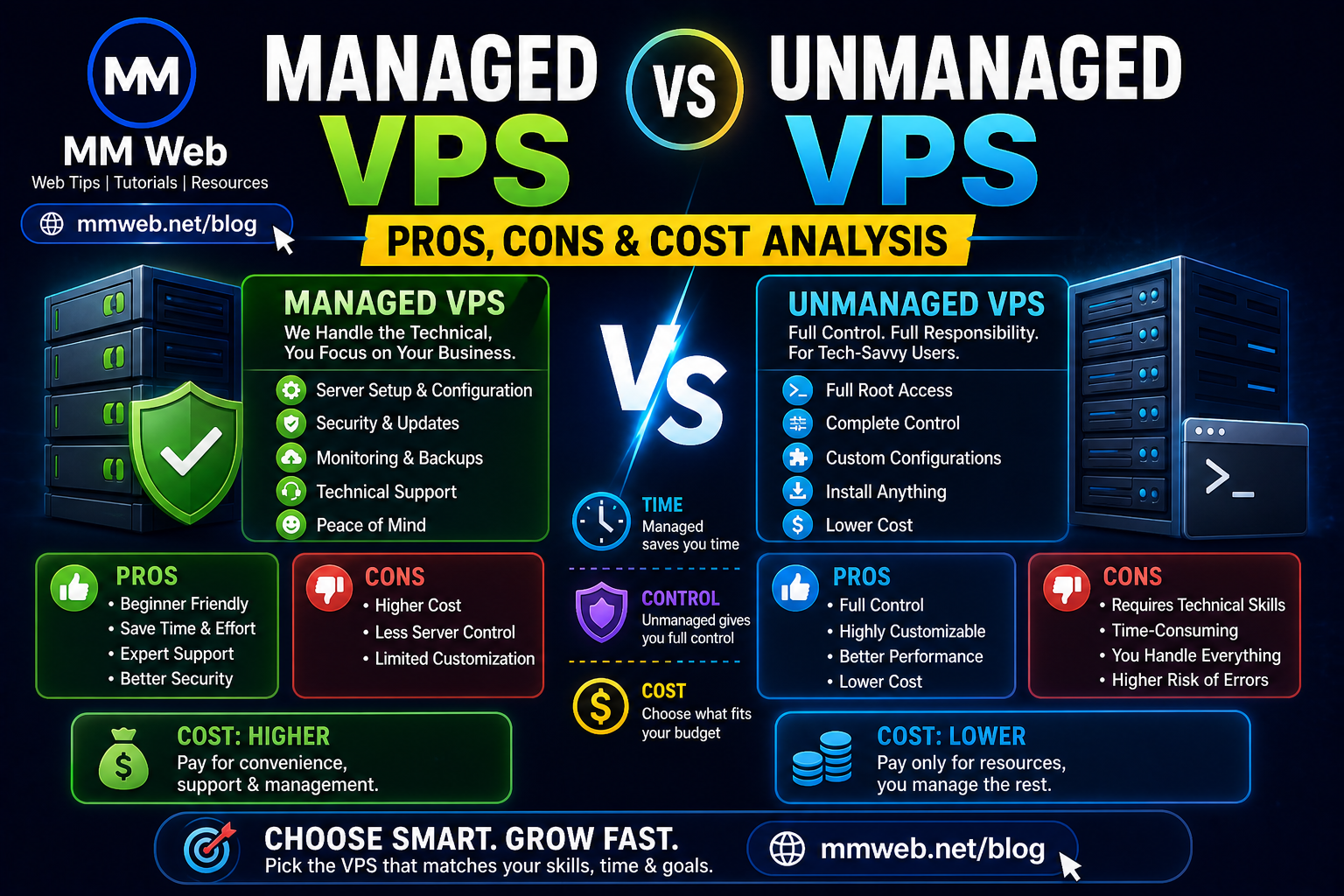
| Responsibility | Unmanaged VPS | Managed VPS |
|---|---|---|
| Server provisioning | You (choose OS, partition disks) | Provider (pre-configured image) |
| OS installation & updates | You (apt-get update && upgrade) | Provider (automatic or notified) |
| Security patching | You (monitor CVEs, apply patches) | Provider (kernel + critical packages) |
| Firewall configuration | You (iptables, UFW, CSF) | Provider (basic setup; advanced is optional) |
| Web server setup (Nginx/Apache) | You (install, configure virtual hosts) | Provider (pre-installed, sometimes tuned) |
| Database installation | You (MySQL/PostgreSQL setup, security) | Provider (optional, pre-configured) |
| PHP/Python/Node.js versions | You (compile or add repos, manage multiple versions) | Provider (pre-installed; you request versions) |
| SSL certificate installation | You (Certbot, manual renewal) | Provider (one-click or automatic) |
| Backup configuration | You (scripts, cron, offsite storage) | Provider (daily backups included) |
| Monitoring & alerting | You (Nagios, Uptime Robot, custom scripts) | Provider (basic monitoring + alerts) |
| Server optimization | You (tune my.cnf, php.ini, kernel params) | Provider (basic optimization; advanced requires ticket) |
| 24/7 support availability | Community forums or paid add-on | Included (chat/ticket/phone) |
| Software conflict resolution | You (debug logs, Google, anger) | Provider (they fix or guide) |
| Scaling (vertical/horizontal) | You (migrate, resize, reconfigure) | Provider (often one-click) |
| Malware cleanup | You (or pay $$$ for incident response) | Provider (often included) |
The core difference: Unmanaged gives you the server. You build the house. Managed gives you a move-in-ready apartment with a super who fixes leaks at 2 AM.
Part 2: Unmanaged VPS — The DIY Powerhouse
What You’re Actually Getting
An unmanaged VPS is a raw virtual machine. You get:
- Root SSH access (you’re
rootor a sudo user) - A fresh OS install (Ubuntu, Debian, CentOS, AlmaLinux, etc.)
- A blank slate (no web server, no database, no control panel)
- A provider that ensures the hypervisor is running and the network is up
That’s it. Everything else—from installing Nginx to configuring firewalls to patting the server gently when it misbehaves—is on you.
Who Unmanaged VPS Is For
✅ Perfect for:
- Developers, sysadmins, and DevOps engineers (or aspiring ones)
- Anyone who genuinely enjoys configuring servers (yes, we exist)
- Projects with tight budgets but flexible timelines (you have time to learn)
- Custom stacks (Node.js + Rust + PostgreSQL + Redis + custom compiled everything)
- Learning environments (break things, learn to fix them, repeat)
- Hosting for technical communities (you can document and share configs)
- Side projects where downtime is annoying but not catastrophic
❌ Not for:
- Business owners whose primary skill is marketing or sales
- Anyone whose hourly rate exceeds $50 (your time is worth more than the savings)
- Mission-critical applications (unless you have dedicated ops staff)
- Teams without a Linux-experienced member
- Anyone who panics when they see a terminal prompt
- Projects requiring PCI/HIPAA compliance (managed often provides compliance assistance)
Pros (The Real Advantages)
Pro 1: Cost — Unbeatable on Paper
Entry-level unmanaged VPS starts at 4–6/month (DigitalOcean, Vultr, Linode). That’s cheaper than many shared hosting plans.
Example pricing (February 2026):
| Provider | RAM | vCPU | Storage | Price |
|---|---|---|---|---|
| DigitalOcean Basic | 1GB | 1 | 25GB NVMe | $6/month |
| Vultr Cloud Compute | 1GB | 1 | 25GB NVMe | $6/month |
| Linode Nanode | 1GB | 1 | 25GB SSD | $5/month |
| AWS Lightsail | 1GB | 1 | 40GB SSD | $5/month |
| Hetzner CX11 | 2GB | 1 | 40GB NVMe | €4.51 (~$5 USD) |
At these prices, unmanaged VPS is 80% cheaper than entry-level managed VPS.
Pro 2: Complete Control
- Install any OS, any kernel module, any software
- Configure every service exactly how you want
- No restrictions on PHP extensions, Python versions, or Node.js runtimes
- Run Docker, Kubernetes, or custom container runtimes
- Tune kernel parameters (
sysctl) for specific workloads
Pro 3: No “Noisy Neighbors” (From Management Policies)
Managed providers often restrict certain activities to maintain stability across their platform. Unmanaged providers give you root and get out of your way.
Pro 4: Deep Learning Opportunity
There’s no better way to learn Linux system administration than running an unmanaged VPS. Every error is a lesson. Every fix builds competence.
Cons (The Hidden Costs)
Con 1: Time — The Uncounted Expense
Let’s do the math honestly.
| Task | Frequency | Time per Occurrence | Monthly Time |
|---|---|---|---|
| Initial server setup (OS, LAMP/LEMP, security) | Once | 4–8 hours | 0.3–0.7 hours (amortized) |
| Weekly security updates | Weekly | 15 minutes | 1 hour |
| Log review (error logs, auth logs) | Weekly | 15 minutes | 1 hour |
| Backup verification | Weekly | 10 minutes | 0.7 hours |
| Performance monitoring review | Weekly | 15 minutes | 1 hour |
| SSL renewal (if manual) | Every 60–90 days | 10 minutes | 0.1 hours |
| Unexpected troubleshooting | Monthly | 1–4 hours | 1–4 hours |
| Total monthly time investment | 5–8 hours |
**At a 50/hourbillablerate:∗∗5–8hours=250–$400/month in your time.
**At a 100/hourrate(seniordev):∗∗500–$800/month.
The “$20/month savings” just evaporated.
Con 2: Security — You’re the Only Line of Defense
- Failed automatic updates: One unpatched vulnerability (like the Dirty Pipe kernel bug) can compromise your entire server.
- Misconfigured firewall: Leave SSH open to the world with password authentication? You’ll be brute-forced within hours.
- No intrusion detection: You won’t know you’re hacked until your site serves malware or your server joins a botnet.
Real data: Unpatched VPS servers are compromised within 72 hours of launch on average, according to several security firms’ honeypot data. I’ve seen it happen in under 4 hours.
Con 3: No Safety Net for Mistakes
Run rm -rf /var/www instead of rm -rf /var/www/old-site? It’s gone. No “undo.” No support ticket to restore it unless you configured your own backups (and tested them).
Accidentally expose your .env file with database credentials? You might not know until your site defaces itself.
Con 4: The “I Just Want to Launch” Tax
Your goal is building a product, not debugging why php-fpm won’t start after an update. Every hour spent on server management is an hour not spent on:
- Writing features
- Acquiring customers
- Creating content
- Sleeping
Con 5: Scaling Complexity
Need to add Redis? You learn Redis. Need to set up a load balancer? You learn HAProxy or Nginx. Need to migrate to a bigger server? You plan the migration, test the migration, execute the migration at 2 AM, and pray.
Real-World Unmanaged Horror Story (Abbreviated)
“I spun up a 6DigitalOceandropletformysideproject.Configuredeverythingperfectly.Threemonthslater,Igota6DigitalOceandropletformysideproject.Configuredeverythingperfectly.Threemonthslater,Igota3,000 bandwidth bill. Someone had used my server as a relay for a DDoS attack because I forgot to secure my Prometheus exporter endpoint. DigitalOcean suspended my account. I lost all my backups because I didn’t configure offsite storage. The project died.”
Don’t be this person.
Part 3: Managed VPS — The Premium Safety Net
What You’re Actually Getting
A managed VPS includes everything unmanaged offers, plus a team of sysadmins responsible for the server’s health. However, “managed” means different things to different providers.
| Management Level | What’s Included | Example Providers |
|---|---|---|
| Basic Managed | OS updates, basic monitoring, firewall setup, support ticket response within 24 hours | KnownHost (entry tier), A2 Hosting |
| Standard Managed | 24/7 support, proactive monitoring, daily backups, security patching, limited optimization | Liquid Web, InMotion, KnownHost (standard) |
| Full Management | Everything above + application-level support (WordPress, WooCommerce, Magento), performance tuning, migration assistance, white-glove service | WP Engine (WordPress-specific), Rocket.net, Kinsta, Cloudways (add-on) |
| Concierge/Agency Management | Dedicated account manager, custom architecture planning, emergency response SLA under 15 minutes, proactive security audits | Liquid Web (Enterprise), Rackspace (legacy) |
Who Managed VPS Is For
✅ Perfect for:
- E-commerce stores (downtime directly loses revenue)
- Agencies hosting client sites (you need SLAs, not excuses)
- SaaS businesses (core product depends on uptime)
- Business owners whose expertise is their product, not Linux
- Teams without dedicated DevOps or sysadmin headcount
- Anyone whose time is worth more than the management premium
- Projects requiring compliance assistance (PCI, HIPAA basics)
- Mission-critical applications with uptime SLAs
❌ Not for:
- Learning Linux (managed abstracts everything away)
- Very tight budgets (<$30/month total hosting cost)
- Highly custom stacks (some managed providers restrict software)
- Developers who enjoy server management (you’re paying for something you like doing)
- Low-traffic personal projects (overkill and expensive)
Pros (Why You’d Pay the Premium)
Pro 1: Time Savings — The Real ROI
Let’s recalc the time investment with managed VPS:
| Task | Responsibility | Your Monthly Time |
|---|---|---|
| Initial server setup | Provider | 0 minutes |
| Security updates | Provider | 0 minutes |
| Log review | Provider (or you optionally review) | 0 minutes |
| Backup verification | Provider (automatic with reporting) | 0 minutes |
| Performance monitoring | Provider (alerts you if issues) | 0 minutes |
| SSL renewal | Provider (automatic) | 0 minutes |
| Unexpected troubleshooting | Provider (you open ticket) | 10 minutes (to describe issue) |
| Total monthly time investment | <30 minutes |
**At a 50/hourrate:∗∗0.5hours×50 = $25/month in your time.
Suddenly, the 60/monthmanagedVPSiseffectively35/month after accounting for your time—cheaper than unmanaged when you include your hours.
Pro 2: Proactive Security
- Kernel updates applied automatically (often with live patching, no reboot required)
- Firewall rules tuned by experts
- Intrusion detection systems (IDS) monitoring for compromise
- Malware scanning (some providers)
- DDoS mitigation (basic to enterprise, depending on provider)
Pro 3: Expert Support (When Things Break)
You’ve never seen this error before. You’ve been Googling for an hour. Managed support has seen it. They have a KB article. They fix it in 15 minutes.
Real example: A client’s php-fpm process kept dying under load. After 6 hours of debugging myself, I opened a ticket with Liquid Web. Their engineer found an obscure pm.max_requests misconfiguration in 20 minutes and provided tuned values. That 20 minutes saved me 6 hours.
Pro 4: Backups That Actually Work
- Automatic daily (or hourly) backups
- Stored off-server (different location from your server)
- One-click restore from dashboard
- Retention periods of 7–90 days (varies by provider)
Critical note: Even with managed hosting, you should still maintain your own off-provider backups (e.g., to AWS S3 or Backblaze B2). Don’t trust any single provider completely.
Pro 5: Performance Baseline
Managed providers optimize their stacks for common use cases (WordPress, WooCommerce, Laravel, etc.). Your server comes pre-tuned. For most sites, this “good enough” optimization beats an unmanaged server tuned by a novice.
Pro 6: Scaling Support
Need to double your RAM at 3 PM on a Tuesday? One click. Need to move to a dedicated server? Support handles the migration. Need help planning for a Black Friday traffic spike? Your provider’s engineers advise.
Cons (The Downsides)
Con 1: Cost — 3–5× More Expensive (On Paper)
| Server Size (RAM) | Unmanaged Price | Managed Price (Standard) | Managed Premium (WordPress-specific) |
|---|---|---|---|
| 1GB | $6 | 25–40 | 40–60 (often minimum 2GB) |
| 2GB | 12–15 | 35–60 | 60–90 |
| 4GB | 24–30 | 50–80 | 90–150 |
| 8GB | 48–60 | 80–150 | 150–250 |
At the low end: Managed is 4–7× more expensive.
At the high end: The premium shrinks to 2–3×.
Con 2: Less Control
Most managed providers restrict root access. You can’t:
- Install arbitrary kernel modules
- Change core system files
- Run Docker (on some providers—Cloudways allows it, others don’t)
- Install custom-compiled software
You get a user with sudo privileges, but critical system areas are locked.
Con 3: Responsibility Gaps
“No one taught me this, but managed doesn’t mean fully managed. Common gaps:
| What’s NOT Usually Managed | You Still Own This |
|---|---|
| Application-level code bugs | Your PHP/Node.js/Python app crashing |
| Database query optimization | Slow queries because your schema is bad |
| CDN configuration | Cloudflare settings, cache rules |
| DNS management | Your A, CNAME, MX records |
| Email deliverability | SPF/DKIM/DMARC configuration |
| Third-party integrations | API timeouts, webhook failures |
| Large traffic spikes (beyond plan limits) | You pay overage or upgrade |
Read your provider’s “Managed Scope” document carefully. The line is often drawn at the OS level. Above that (your app), you’re on your own.
Con 4: “Management by Ticket” Latency
Even with 24/7 support, opening a ticket takes time. Critical issues get faster responses (15–30 minutes), but non-critical tickets can take 2–24 hours.
If you need immediate control (e.g., “block this IP right now”), managed can feel slow compared to SSH’ing into an unmanaged server and running a command instantly.
Con 5: Vendor Lock-In (Migration Pain)
Leaving a managed provider is harder than leaving unmanaged. Why?
- Custom control panel (you no longer have a standard cPanel or Plesk)
- Proprietary backup formats
- Specific stack optimizations that don’t translate
- Migration support ends when you cancel
Unmanaged servers, by contrast, are standardized. Moving from DigitalOcean to Vultr is just rsync + DNS change.
Part 4: Cost Analysis — The Real Numbers
Let’s compare total cost of ownership (TCO) for a 2GB VPS over 12 months.
Scenario A: Unmanaged VPS (DIY)
| Cost Category | Calculation | Annual Cost |
|---|---|---|
| Server ($15/month) | $15 × 12 | $180 |
| Your time (5 hours/month at $50/hr) | $250 × 12 | $3,000 |
| Backup storage (offsite, 100GB) | $5 × 12 | $60 |
| Monitoring service (Uptime Robot, basic free) | $0 | $0 |
| Incident response (one hack cleanup, very conservative) | $300 (one-time, maybe) | $300 |
| Total Year 1 Cost | $3,540 | |
| Total Year 2+ Cost (less setup time) | 180+2,400 (4 hrs/month) + $60 | $2,640/year |
Scenario B: Managed VPS (Standard, e.g., KnownHost)
| Cost Category | Calculation | Annual Cost |
|---|---|---|
| Server ($50/month) | $50 × 12 | $600 |
| Your time (0.5 hours/month at $50/hr) | $25 × 12 | $300 |
| Backup storage (included) | $0 | $0 |
| Monitoring (included) | $0 | $0 |
| Incident response (provider handles) | $0 | $0 |
| Total Annual Cost | $900 |
The Verdict: Managed Wins on TCO (For Most Businesses)
| Metric | Unmanaged | Managed |
|---|---|---|
| Out-of-pocket cash | $180/year | $600/year |
| Total cost (including your time) | $3,540/year | $900/year |
| Risk-adjusted cost (probability × impact of breach) | Higher (no IDS, no proactive patching) | Lower |
The breakeven point: If your time is worth more than ~$15/hour, managed VPS is cheaper overall.
When Unmanaged Wins on TCO
Unmanaged is cheaper only if:
- Your time is worth 0–10/hour (student, hobbyist, learning)
- You genuinely enjoy server management as recreation (not “work”)
- You already have the skills and can do tasks in 1/5th the average time
- Your site is non-critical (downtime has zero cost)
- You never have a security incident (lucky or very good)
For everyone else, managed VPS has better total cost of ownership.
Part 5: The Hybrid Zone — “Managed” on a Budget
Two models blur the line between unmanaged and managed.
Option A: Cloudways-Style Platform Management
Cloudways (and similar: RunCloud, ServerPilot, Ploi) sits between unmanaged and fully managed.
How it works:
- You rent an unmanaged VPS from DigitalOcean, Vultr, AWS, etc.
- Cloudways installs their management layer (control panel, monitoring, security)
- You get one-click app installs, backups, staging environments, basic support
| Provider | Monthly Fee (on top of server cost) | Included |
|---|---|---|
| Cloudways | 12–18 (plus server cost) | Control panel, backups, 24/7 chat support, basic firewall |
| RunCloud | 8–15 | Control panel, no server management, support for server issues is limited |
| ServerPilot | 5–20 | Control panel only (no backups, minimal support) |
| Ploi | 8–16 | Similar to RunCloud |
Example total: 15(DigitalOcean)+15 (Cloudways) = $30/month.
Pros: Cheaper than fully managed (30vs50–80), more control than managed.
Cons: Less support than fully managed (they help with panel, not deep OS issues).
Who this is for: Developers who want some help but don’t need hand-holding.
Option B: Managed WordPress Hosting (The Special Case)
For WordPress specifically, managed WordPress hosting (WP Engine, Kinsta, Rocket.net) is a subset of managed VPS.
| Feature | Standard Managed VPS | Managed WordPress Hosting |
|---|---|---|
| Supports any PHP app | Yes | No (WordPress only) |
| WordPress-specific caching | Basic (Redis) | Advanced (object cache + page cache + CDN) |
| WordPress security rules | Generic WAF | WordPress-specific firewall (e.g., patched vulnerabilities) |
| Staging environment | You build (or provider offers basic) | One-click + push/pull to production |
| Plugin/theme issues | Support won’t help | Often will debug or revert |
| Price (entry) | 30–60/month | 30–40/month |
Verdict: For WordPress sites generating revenue, managed WordPress hosting is often a better value than general managed VPS.
Part 6: Decision Matrix — 7 Questions to Choose
Question 1: What’s your monthly hosting budget (excluding your time)?
| Budget | Recommendation |
|---|---|
| <$20/month | Unmanaged VPS (or shared hosting—don’t force VPS) |
| 20–40/month | Hybrid (Cloudways/RunCloud) or entry managed |
| 40–80/month | Standard managed VPS |
| $80+/month | Premium managed VPS or managed WordPress hosting |
Question 2: How many hours per week can you dedicate to server management?
| Hours/Week | Recommendation |
|---|---|
| 0–1 | Managed VPS |
| 1–3 | Hybrid (Cloudways) or entry managed |
| 3–5 | Unmanaged VPS (if you want to learn) |
| 5+ | Unmanaged VPS (you’re becoming a sysadmin) |
Question 3: What happens if your server goes down for 2 hours on a Tuesday afternoon?
| Consequence | Recommendation |
|---|---|
| “I’d be mildly annoyed” | Unmanaged or hybrid |
| “I’d lose 50–500″ | Managed VPS |
| “I’d lose 500–5,000″ | Premium managed with SLA |
| “I’d be fired” | Managed + dedicated support + redundancy |
Question 4: Do you already know Linux system administration?
- “I’ve never used the terminal”: Managed VPS (do not attempt unmanaged—seriously)
- “I know basic commands (
ls,cd,grep)”: Hybrid (Cloudways) or entry managed - “I’ve set up a LAMP stack before”: Unmanaged or hybrid
- “I’ve debugged kernel panics and compiled custom kernels”: Unmanaged (you don’t need this article)
Question 5: Is this a business with revenue, or a hobby?
| Type | Recommendation |
|---|---|
| Hobby/personal project | Unmanaged VPS (great learning) |
| Side project with no revenue | Unmanaged or hybrid |
| Business with revenue (<$1k/month) | Hybrid or entry managed |
| Business with revenue (>$1k/month) | Managed VPS (your time is more valuable) |
Question 6: Do you need specific compliance (PCI, HIPAA, GDPR)?
| Requirement | Recommendation |
|---|---|
| None | Any |
| PCI Level 4 (low-volume e-commerce) | Managed VPS (provider assists with compliance documentation) |
| PCI Level 1 or HIPAA | Managed dedicated or specialized cloud (not standard managed VPS) |
Question 7: How comfortable are you with security?
- “I use the same password everywhere”: Managed VPS (do not pass Go, do not collect unmanaged)
- “I use a password manager and 2FA”: Hybrid or managed
- “I understand SSH key auth, fail2ban, and SELinux”: Unmanaged or hybrid
- “I follow CVE feeds and apply patches within 24 hours”: Unmanaged (you’re qualified)
Part 7: Provider Recommendations (2026)
Unmanaged VPS (Best for Learning/Devs)
| Provider | Starting Price | Best For |
|---|---|---|
| DigitalOcean | $6/month | Documentation, community, ease of use |
| Vultr | $6/month | More locations, high-frequency compute options |
| Linode (Akamai) | $5/month | Stability, support quality |
| Hetzner | €4.51 (~$5) | Best value (EU-focused, but US locations available) |
| AWS Lightsail | $5/month | If you’re already in AWS ecosystem |
Hybrid (Platform Management)
| Provider | Price (plus server) | Support Level |
|---|---|---|
| Cloudways | 12–18 | 24/7 chat + ticket (good for platform issues) |
| RunCloud | 8–15 | Ticket only (less hand-holding) |
| Ploi | 8–16 | Discord community + ticket |
Managed VPS (General Purpose)
| Provider | Starting Price | Management Level |
|---|---|---|
| KnownHost | $35/month | 24/7 support, proactive monitoring, cPanel included |
| Liquid Web | $50/month | 59-second response SLA (enterprise focus) |
| InMotion Hosting | $45/month | Good mid-range option |
| A2 Hosting | $35/month | Developer-friendly managed |
Managed WordPress Hosting (Specialized)
| Provider | Starting Price | Best For |
|---|---|---|
| WP Engine | $30/month | Enterprise, agencies, high-traffic |
| Kinsta | $35/month | Developers, Google Cloud infrastructure |
| Rocket.net | $30/month | Speed-optimized, global CDN included |
| Cloudways WordPress | $15 + server | Budget managed WordPress (hybrid model) |
Part 8: Conclusion — The Honest Recommendation
Choose UNMANAGED VPS if:
- You are a developer or sysadmin who enjoys (or wants to learn) server management
- Your time has low opportunity cost (student, hobbyist, between jobs)
- Your site is non-critical (downtime is annoying, not catastrophic)
- Your budget is extremely tight (<$20/month total)
- You need absolute control over every system aspect
Choose MANAGED VPS if:
- Your time is worth >$20–30/hour (most professionals)
- Your site generates revenue (ecommerce, SaaS, agency client hosting)
- You don’t want to be on call for server emergencies
- Security compliance matters to you or your clients
- You have no dedicated sysadmin on your team
- You want predictable monthly costs (including your time)
Choose HYBRID (Cloudways-style) if:
- You’re in the middle: comfortable with basics but want backup
- You want managed features but lower cost
- You like control but appreciate good tooling
The bottom line for 90% of readers:
- Hobby/learning: Unmanaged VPS (DigitalOcean $6/month)
- Side project with revenue potential: Hybrid (Cloudways $30/month total)
- Real business with customers: Managed VPS ($50–80/month)
- WordPress business site: Managed WordPress hosting ($30–50/month)
Don’t let the sticker shock of managed VPS scare you. Calculate your time honestly. Most people who try to “save money” on unmanaged VPS end up spending more—in frustration, lost sleep, and eventually cash when they migrate to managed after a crisis.
Start where you belong today. Upgrade when you outgrow it. Don’t start on unmanaged because you’re “supposed to” or because a YouTuber made it look easy.
Your server is infrastructure. Infrastructure needs maintenance. Pay for it with money or pay for it with time. Just don’t pretend you can pay with nothing.